Point of sale for your shop and web store

The till that keeps selling when the internet drops.

LAFU POS keeps your shop and your WooCommerce store on one stock. When something sells at the counter, your web store knows – and the other way round. No more updating by hand, and no more web orders for things you already sold over the counter.

30 days free, no card details. The demo opens right in your browser, no sign-up needed.

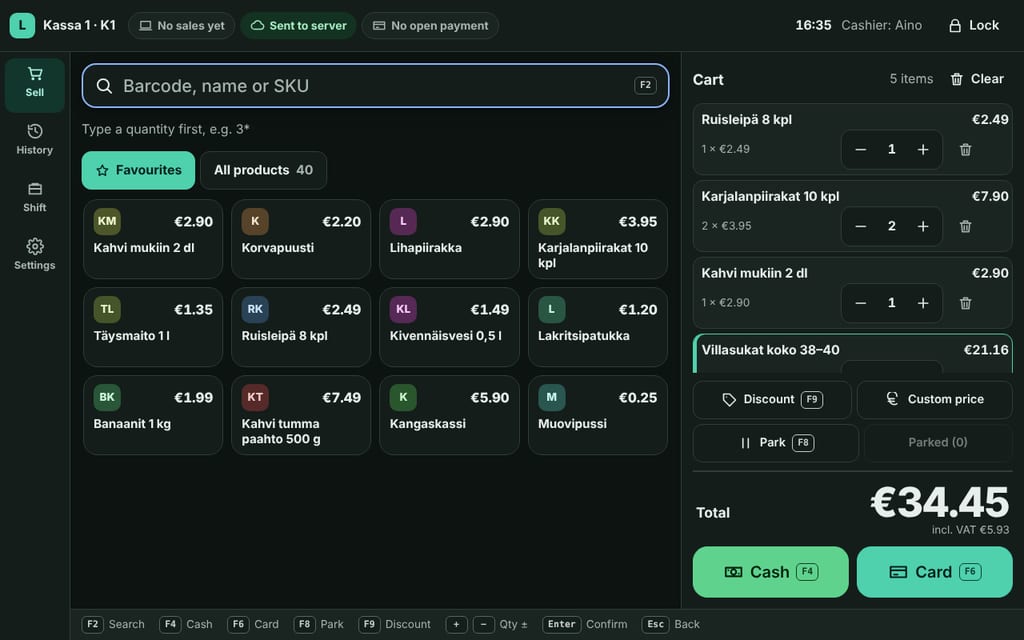
The LAFU POS till: five items in the cart, a total of €34.45, quick picks for products and large buttons for cash and card.
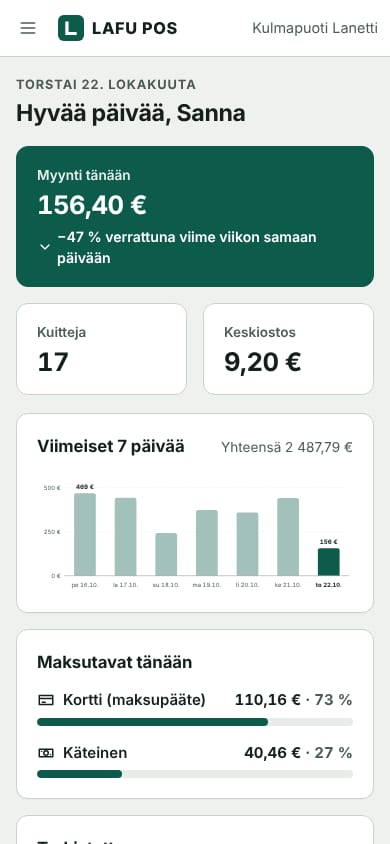
The LAFU POS dashboard on a phone: today's sales and number of receipts.
  • Sells offline too
  • Two-way WooCommerce stock
  • Support in Finnish and English
  • No setup fee, no contract

Try it now

Try it before you decide

Both demos run right in your browser with the data of Kulmapuoti Lanetti, a made-up corner shop. Click around as much as you like – you can't break anything.

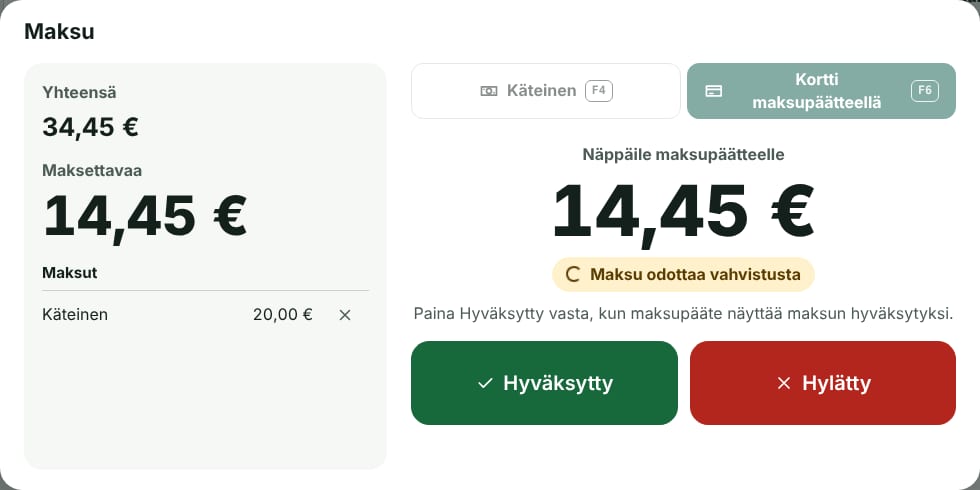
  • The till's payment window: €14.45 waiting for the card terminal to confirm.

    Till

    Scan a barcode or tap a quick pick, give a discount and take cash or card. See how the till copes when the internet goes down, too.

    The demo opens in Finnish: switch to English on the first screen. The setup code is filled in; name the till and pick a PIN to start selling.

    Try the till
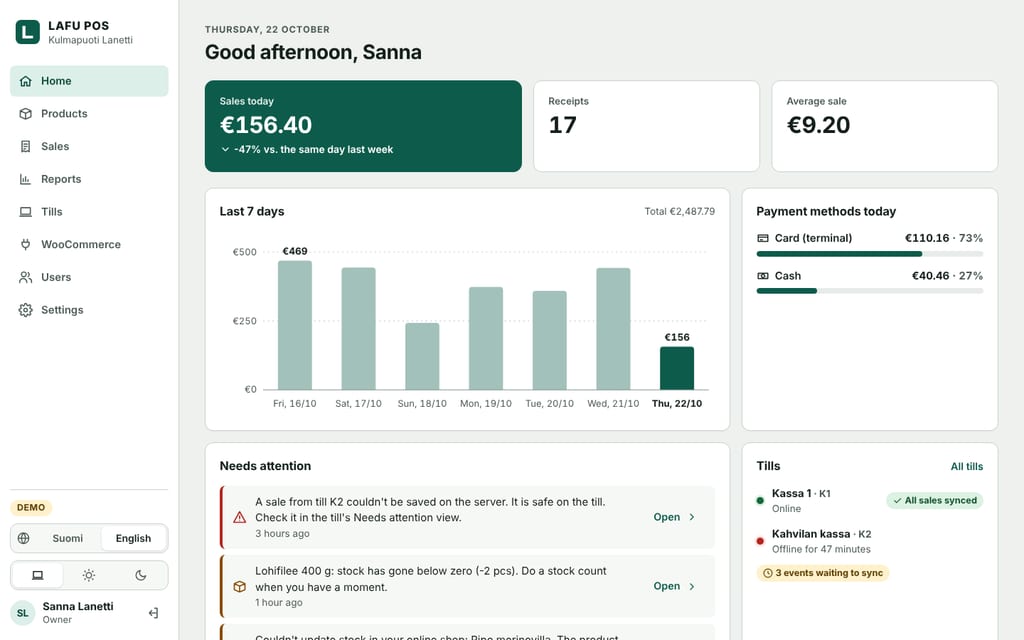
  • Dashboard home: sales today €156.40, 17 receipts and the week's sales as a bar chart.

    Dashboard

    See today's sales, browse receipts, fix stock levels and add barcodes. The dashboard is also where you set up new tills and connect your web store.

    The demo opens in Finnish: switch to English on the sign-in page, then choose “Use demo account” and sign in.

    Try the dashboard

Nothing in the demo leaves your computer. Its data stays in your browser, and nothing is sent to a server.

Made for behind the counter

No clutter, and no add-on modules billed separately. All of this comes with every plan.

Works offline

No sale is lost when the connection drops

Every sale is saved on the till first, and only then sent on. If the internet drops, the till keeps selling and sends the receipts as soon as the connection is back.

  • A sale only shows as done once it's safely saved.
  • The till always shows which receipts are still waiting to sync.
  • Queued receipts arrive in the right order.
  • Saved on till · K1-2
  • Waiting to sync: 2
  • Sent to server
The till's status bar shows at a glance where every sale is.

Card payments

A card payment counts only once the terminal says yes

LAFU POS works next to the card terminal you already have. You key the amount into the terminal, and the cashier confirms on the till whether it went through. An unfinished payment never shows as paid.

  • Works with any card terminal
  • Cash and card in the same sale
  • We take no cut of your card payments
The till's payment window: €14.45 waiting for the card terminal, with Approved and Declined buttons.

Shifts and reports

Wrap up the day with a Z report

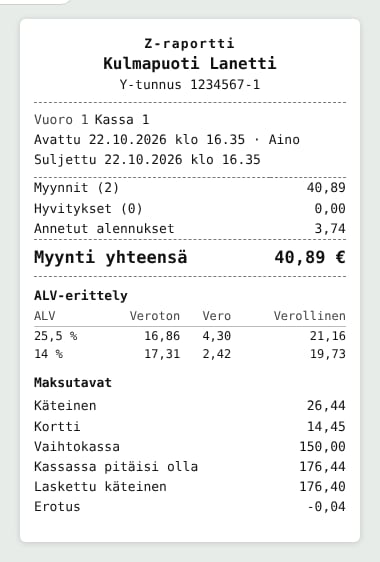
Open a shift with a cash float, count the cash at closing and print the Z report. It lists sales, discounts, payment methods and VAT per rate – just the way your accountant wants it.

  • X report during the day, Z report at the end of a shift
  • Cash difference worked out for you
  • VAT breakdown for every rate
A Z report: total sales €40.89, a VAT breakdown per rate and payment methods. Shown in Finnish.

Dashboard

Your shop in your pocket

The dashboard shows today's sales, how your tills are doing and anything that needs your attention. It works just as well on a computer as on your phone.

  • Sales, receipts and reports from every till
  • Products, barcodes and stock levels
  • Staff and what they can access
Dashboard home: sales today €156.40, 17 receipts, the last seven days as a bar chart, payment methods and the status of each till.
  • Barcodes and shortcuts

    Scan products with an ordinary barcode scanner and take payment with the F keys. An experienced cashier never needs the mouse.

  • Clear receipts

    Receipts list the items, the payment method and VAT per rate, the way Finnish receipts should.

  • One stock, two shops

    Your shop and your web store see the same stock level, so the last item never sells twice.

  • Staff and PINs

    Every cashier has their own PIN. The till locks with one tap, and shifts are recorded under the cashier's name.

  • Discounts and parked sales

    Give a discount, sell at a custom price, or park a sale while the customer goes back for one more thing.

  • A computer or tablet is enough

    The till runs in a web browser, so you don't need expensive special hardware. The dashboard works on your phone too.

LAFU POS for WooCommerce

Your shop and your web store, one stock

A free WordPress plugin connects your WooCommerce store and your till in both directions. You update products in one place, and stock stays right in both.

  • Products, prices and SKUs come from your web store to the till, variations included.
  • Barcodes added at the till are saved to your web store's products.
  • Shop sales reduce web store stock, and web orders reduce shop stock.
  • If the connection drops, changes wait in line and arrive in the right order.
  • The plugin never sends customer names, addresses or payment details.
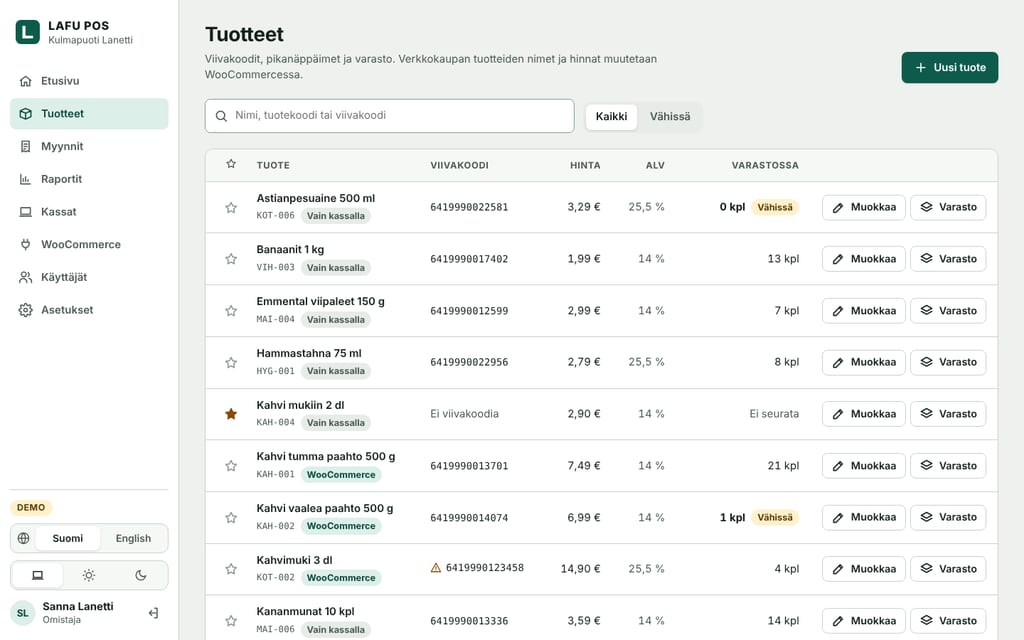
The dashboard's product list: barcodes, prices, VAT rates and stock levels. Products from the web store carry a WooCommerce tag. Shown in Finnish.
Products from your web store carry a WooCommerce tag in the dashboard; till-only products are marked as such.

Connected in three steps

  1. Install and activate the LAFU POS for WooCommerce plugin.
  2. Create a connection key in the plugin's settings.
  3. Paste the key into the LAFU POS dashboard. Your products appear on the till by themselves.

Needs WordPress 6.5, WooCommerce 8.5 and PHP 7.4 or newer. Compatible with WooCommerce High-Performance Order Storage and the block-based checkout.

Up and running in an afternoon

No new cash register and no installer. A computer or tablet with a web browser is enough.

  1. Connect your web store

    Install the LAFU POS for WooCommerce plugin. Your products and prices appear on the till by themselves. No web store? Add products in the dashboard.

  2. Open the till

    Set up the till with a code from the dashboard. Plug in a barcode scanner and a receipt printer, and scan any missing barcodes straight from the products.

  3. Start selling

    Take cash and cards on the card terminal you already have. Every sale comes off the same stock, whether it happens at the counter or online.

Introductory prices

Simple pricing, no surprises

No setup fee, no fixed-term contract and no cut of your card payments. WooCommerce sync, offline selling and support in Finnish are in every plan.

These are provisional introductory prices. We'll confirm them before the service opens to everyone.

  • Start

    For market stalls, pop-ups and shops just getting going.

    €0 / month

    free for good

    • 1 till
    • Up to 300 sales a month
    • WooCommerce sync
    • Sells offline
    • Email support
    Start for free
  • Multi-store

    When you run more than one shop.

    €79 / month

    3 tills, any number of shops

    or €790 a year – two months free

    • Everything in Shop
    • Stock per shop
    • Combined reports for all shops
    • Access rights per shop
    • Same-day support
    Ask us
  • Extra till €15 / month
  • 30-day free trial
  • Cancel any month

Prices exclude VAT. Finnish VAT of 25.5% is added to the invoice.

How we compare

Price for one till per month, for a shop that also runs a WooCommerce store. The cheapest line isn't always the cheapest in the end: percentage fees grow with your sales.

Point of salePrice / monthCard feesWooCommerce
LAFU POS Kauppa €29 No cut of card payments Products, barcodes and stock both ways. Sells offline too.
Zettle (PayPal) €0 1.95% of every card payment Products and stock via plugin
Vektori Kassa Plus €29 + €15 stock module, €79 setup Terminal provider's own fees Stock and web orders
E-kassa Premium €29.90–39.90 From 0.39% Stock, possibly a paid add-on
Shopify POS Pro €59–79 per shop + Shopify plan Shopify Payments fees Does not work with WooCommerce
Lightspeed Retail from $89 per shop Lightspeed Payments fees Own integration

Competitor prices are taken from the providers' public information in October 2026, excluding VAT. Prices and terms may change, so check the latest details with each provider.

Questions and answers

Didn't find your answer? Write to us and we'll reply within a working day.

pos@lanetti.fi

What happens if the internet goes down mid-day?

The till keeps selling as normal. Sales are saved on the till and sync to the service and your web store by themselves when the connection comes back. The till always shows which sales are still waiting. If it has been offline for two weeks, it reminds you.

Will my current card terminal work?

Yes. LAFU POS works alongside any card terminal: you key the amount into the terminal and confirm the payment on the till. Your terminal keeps using its own connection, as before. A direct terminal connection is coming later. We take no cut of your card payments.

Do I need a WooCommerce store?

No. The till works fine without a web store: you add products, prices and barcodes in the dashboard. If you open a web store later, connect it with the plugin.

What hardware do I need?

A computer or tablet with an up-to-date web browser. We also recommend a barcode scanner that works like a keyboard, and a receipt printer if you want to hand out paper receipts. No expensive special equipment, and we're happy to help you choose.

What can I do in the demo?

Everything you can do on a real till: sell, give discounts, take payments, open and close shifts and print reports. In the till's settings you can also simulate an internet outage. The demo uses made-up data that stays in your own browser.

Where is my data stored?

In the EU. The service is run by Lanetti, a Finnish company, and your data is kept in a European provider's data centres. Backups are kept separate from the servers, and every sale is also saved on the till. Your data is yours, and you can export it whenever you like.

How do I switch from another point of sale?

If your products are already in WooCommerce, the plugin brings them to the till as they are. You can run LAFU POS next to your old till during the trial and switch when you're ready. We'll help you move, in Finnish or English.

Am I tied into a contract?

No. Plans are billed monthly with no setup fee. Change plans or stop at the end of any month. If you don't pick a plan after the trial, your account moves to the free Start plan and nothing is deleted.

A Finnish till with Finnish support

LAFU POS is built by LAFU and run by Lanetti, a Finnish hosting company. When you call or write, a real person who speaks your language answers.

  • Support in Finnish

    We help with setup, hardware and everyday questions in Finnish and English.

  • Data in the EU

    Servers and backups are in the EU. We don't sell your data, and we don't use tracking cookies.

  • Made for Finnish shops

    Prices include VAT the Finnish way, and receipts and reports follow Finnish practice.

Try LAFU POS in your own shop

30 days free, no card details. Or open the demo and see for yourself how the till feels.